---
title: "Creating Your First PyTorch Model: Data Preparation"
description: Learn how to prepare data for your first PyTorch model using a social anxiety dataset, covering feature types, one-hot encoding, and exploratory data analysis.
image: https://blog.rheinwerk-computing.com/hubfs/Creating%20Your%20First%20PyTorch%20Model_%20Data%20Preparation.jpg
---
[](https://blog.rheinwerk-computing.com/) [Blog](https://blog.rheinwerk-computing.com)
- Books
- Get an overview of our wide selection of books on every relevant computing topic.
- [General Computing](https://www.sap-press.com/rheinwerk-computing/general-computing/)
- [DevOps](https://www.sap-press.com/rheinwerk-computing/devops/)
- [Programming Languages](https://www.sap-press.com/rheinwerk-computing/programming-languages/)
- [Security](https://www.sap-press.com/rheinwerk-computing/security/)
- [Software Development](https://www.sap-press.com/rheinwerk-computing/software-development/)
- Book Subscription
- Get unlimited access to all Rheinwerk Computing books!
- [Programming Subscription](https://sap-press.com/subscriptions/)
[Featured](https://blog.rheinwerk-computing.com/tag/featured)
# Creating Your First PyTorch Model: Data Preparation
 by [Rheinwerk Computing](https://blog.rheinwerk-computing.com/author/rheinwerk-computing)
Building a machine learning model is only as good as the data you feed it.
Before any training can happen, raw data needs to be understood, cleaned, and shaped into a form that algorithms can actually work with. This post walks through the foundational steps of data preparation using a real-world social anxiety dataset: what feature types mean, how to handle categorical variables, how to explore your data visually, and why scaling matters more than most beginners expect.
We’ll work with a data set from [Kaggle](http://www.kaggle.com), which is an online community with a special focus on data analysts and data scientists. With this platform, you can explore datasets, perform analyses, and learn from others who have already worked with the data. It’s a very valuable source of knowledge.
Specifically, we’ll work with the “[Social Anxiety Dataset](https://www.kaggle.com/datasets/natezhang123/social-anxiety-dataset)”, which contains more than 10,000 samples of people who have different levels of social anxiety. Each person’s anxiety level is rated on a point scale from 1 to 10, and this is the target (or dependent) variable that the model will ultimately predict. The figure below shows a section of the dataset.

You need to prepare the dataset, and before you can do that, you need to learn about different feature types and different data types. Often, you’ll need to reshape the data, especially to transform numerical data into categorical data. An important aspect of data preparation is that you need to make yourself familiar with the data in a process called exploratory data analysis. Finally, we’ll cover data scaling, which is an important step for ensuring a stable model training.
## Feature Types
Our dataset contains various *independent variables*, including demographic characteristics such as age, gender, and occupation. Other characteristics can fall into the areas of general health, mental indicators, and mental health.
### Independent and Dependent Features
The terms *independent features* and *dependent features* refer to the roles that variables (columns) play in a dataset. This concept is primarily used in supervised learning.
*Independent features* are also called *input variables*, predictors, or *characteristics*, and they are the inputs for ML models. It’s assumed that independent features are the causes of or influencing factors for the dependent variable. In statistics, *dependent features* are also called *target variables*, *output variables*, or *labels*, and they are the output values that are ultimately predicted by the model.
The ML model thus learns the relationships or patterns that exist between the independent and dependent variables, and after it has been trained, it can use this knowledge to predict future values of the dependent variable based on new values of the independent features.
At the beginning of each script, we load all the required packages and classes as shown in the listing below. As previously mentioned, the dataset comes from Kaggle, and we can import it directly using the kagglehub in-house package. We’ll import the data as a pandas dataframe, and we’ll need the numpy package to later convert the data from a dataframe into a numpy array.
We’ll get into the topic of scaling the data later. At this point, we load the standard scaler from the sklearn package. We always use the os package when we want to interact with operating system functions, and we use seaborn and matplotlib to visualize the data and results.
`#%% packages`
`import numpy as np`
`import pandas as pd`
`import kagglehub`
`import os`
`from sklearn.preprocessing import StandardScaler`
`import seaborn as sns`
`import matplotlib.pyplot as plt`
Kaggle provides us with an easy way to import data into Python by using the kagglehubpackage. In the next listing, we only have to load the dataset via its id. During loading, the dataset is copied to the hard disk and the folder is returned. The file is saved in the folder, and we can then load it directly via pd.read\_csv(). At that point, we will have successfully loaded the data and created the anxiety dataframe.
`#%% Download latest version`
`path = kagglehub.dataset_download("natezhang123/social-anxiety-dataset")`
`print("Path to dataset files:", path)`
`#%% Data import`
`anxiety_file = os.path.join(path, 'enhanced_anxiety_dataset.csv')`
`anxiety = pd.read_csv(anxiety_file)`
`Path to dataset files: C:\Users\BertGollnick\.cache\kagglehub\datasets\natezhang123\social-anxiety-dataset\versions\2`
Now, let’s take a look at which columns and how many rows and columns the dataset has, as shown below.
`print(f"anxiety.columns: {anxiety.columns}")`
`print(f"anxiety.shape: {anxiety.shape}")`
`anxiety.columns: Index(['Age', 'Gender', 'Occupation', 'Sleep Hours',`
` 'Physical Activity (hrs/week)', 'Caffeine Intake (mg/day)',`
` 'Alcohol Consumption (drinks/week)', 'Smoking',`
` 'Family History of Anxiety', 'Stress Level (1-10)',`
` 'Heart Rate (bpm)', 'Breathing Rate (breaths/min)',`
` 'Sweating Level (1-5)', 'Dizziness', 'Medication',`
` 'Therapy Sessions (per month)', 'Recent Major Life Event',`
` 'Diet Quality (1-10)', 'Anxiety Level (1-10)'],`
` dtype='object')`
`anxiety.shape: (11000, 19)`
The dataset comprises a total of 11,000 samples and 19 features, some of which contain text rather than numerical information. This is the case with the “Smoking” feature, for example, which has two states: “Yes” and “No.”
## Data Types
At this point, let’s consider what types of data there are. There are generally two main data types: numerical data and categorical data, as follows:
- **Numerical data:** This is also known as *quantitative data* or *metric data*, and it consists of numbers that can be measured.
- **Categorical data:** This is also called *qualitative data* or *nominal data*, and it describes qualities or categories (like gender or occupation) that can’t be measured or counted in the conventional sense. Categorical data can be further subdivided into *nominal data*, which are unordered (e.g., favorite colors) and *ordinal data*, which are categories with a natural order (e.g., academic degrees, educational qualifications).
Since PyTorch can only process numerical data, you must convert all features that contain categorical information into numerical information. You can do this with one-hot encoding.
## One-Hot Encoding
*One-hot encoding* is a special technique used in machine learning to convert categorical data into a numerical format, which is the only way the data can be processed by algorithms. How does one-hot encoding work? We can illustrate the underlying concept with an example. Imagine that the favorite-color column has been entered into a data set about people (see table below).
| **Person** | **favorite\_color** |
| --- | --- |
| Bob | Yellow |
| Stuart | Green |
| Kevin | Red |
| Gru | Green |
With one-hot encoding, all unique values recorded are displayed as a single column. After applying one-hot encoding, the favorite\_color column is converted into as many columns as there are unique values. In our example, there are three unique values:\[yellow, green, red\]. These are used to create the favorite\_color\_yellow, favorite\_color\_green, and favorite\_color\_red columns.
These columns only contain binary information, so the numerical value is 1 if it corresponds to the favorite color and 0 if it doesn’t. For each person, the 1 is then entered into the column corresponding to the favorite color. Therefore the table above looks like the one below after one-hot encoding.
| **Person** | **favorite\_color\_yellow** | **favorite\_color\_green** | **favorite\_color\_red** |
| --- | --- | --- | --- |
| Bob | 1 | 0 | 0 |
| Stuart | 0 | 1 | 0 |
| Kevin | 0 | 0 | 1 |
| Gru | 0 | 1 | 0 |
You can even omit a column without losing information because the column is then implicitly derived from the other columns—specifically, if there are only the colors yellow, green and red and each person has exactly one favorite color.
In this form, the information is now represented numerically and is therefore suitable for use in most ML algorithms. Another advantage is that there’s no implicit order. Imagine the original colors had been encoded numerically (e.g., yellow = 1, green = 2, red = 3). Then, the original form would have formally met the requirements of ML algorithms since the information would have been encoded numerically. But the algorithm would have also implicitly “assumed” an order of the colors in which green would have counted twice as much as yellow and red would have counted three times as much as yellow, which makes no sense. You can avoid such problems with one-hot encoding.
One clear disadvantage of one-hot encoding is that the number of dimensions increases. Especially when there are many different characteristics, this is reflected in many new features, which is associated with increased training time for the model and the *curse of dimensionality*—the fact that problems occur when the number of features is large compared to the number of data points.
Now, let’s apply this newly learned technique to our data. Thankfully, the developers of the pandas package have made our work here very easy so that we can create one-hot coding with the pd.get\_dummies method.
The listing below illustrates how one-hot encoding is implemented. In addition to the anxiety data set, several other parameters are passed. The drop\_first parameter ensures that the first encoded column is omitted and dummy variables are obtained.
`anxiety_dummies = pd.get_dummies(anxiety, drop_first=True, dtype=int)`
`anxiety_dummies.head()`
`#%% df shape`
`anxiety_dummies.shape`
`(11000, 31)`
By using this technique, we’ve increased the number of columns from 19 to 31. Now, we can look at the context of the data to improve our understanding.
## Exploratory Data Analysis
In our next example, we’ll look at how sleep behavior affects anxiety disorders. The corresponding code is shown below.
`sns.regplot(x='Sleep Hours', y='Anxiety Level (1-10)', data=anxiety_dummies,`
`color='blue', line_kws={'color': 'red'})`
`# add a title`
`plt.title('Sleep Hours vs Anxiety Level')`
`# add x title`
`plt.xlabel('Sleep Hours')`
`# add y title`
`plt.ylabel('Anxiety Level')`
This results in the correlation shown in the figure below. The data points are shown as a dot plot (with blue dots). In addition, the linear correlation between the two variables is shown as a red line.
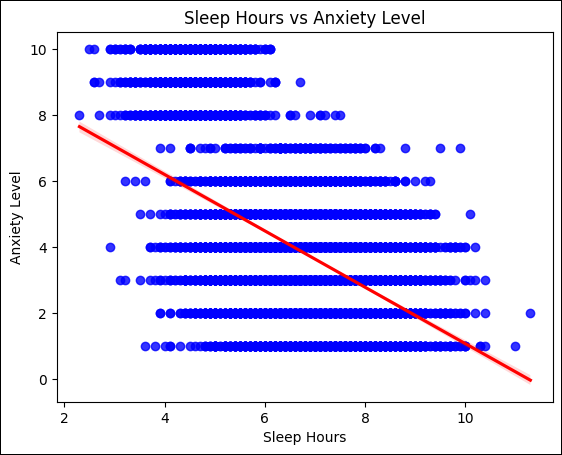
The correlation is quite clear: anxiety levels increase as hours of sleep decrease. This is just one possible connection—we have a total of 30 independent features that we could look at.
To get a quick overview, we can determine and display the correlation between the independent features and the target variable in a correlation matrix as a heat map. A *heat map* is a diagram form in which the categorical information is coded as color values. The linear correlations among all variables are determined and can then be visualized as color values.
The figure below illustrates how the correlations are determined. For the sake of clarity, only numerical features are analyzed. The filtered pandas numerical\_features data frame has the corr() method, which we can used to determine the linear correlation among all features. With N columns, this results in a corr correlation matrix with the dimensions N x N.
`#%% check correlation`
`# Select only numerical features for correlation analysis`
`numerical_features = anxiety.select_dtypes(include=['int64', 'float64'])`
`corr = numerical_features.corr()`
The listing below shows how we can now visualize these correlations with sns.heatmap. As the matrix is symmetrical, we just need to look at the upper or lower triangle, and we can implement this by using a mask, which is then passed as a parameter to the heatmap.
This mask consists of N x N Boolean values, and it specifies which values are to be displayed.
`# Create mask for upper triangle`
`mask = np.triu(np.ones_like(corr, dtype=bool))`
`# Plot correlation heatmap`
`sns.heatmap(corr, annot=False, cmap='coolwarm', vmin=-1, vmax=1, mask=mask)`
`plt.title('Correlation Heatmap (Numerical Features Only)', fontsize=10)`
`plt.xticks(rotation=45, ha='right', fontsize=8)`
`plt.yticks(rotation=0, ha='right', fontsize=8)`
`plt.tight_layout()`
`plt.show()`
Our visualization of the numerical features is shown in the next figure, where the color coding ranges from –1 (blue), to 0 (gray), to +1 (red).
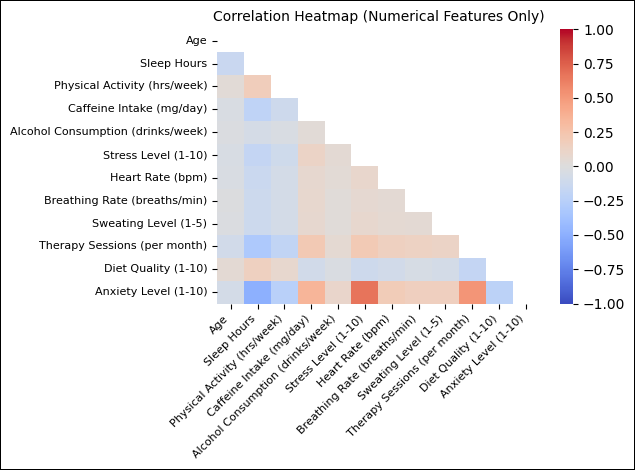
In the figure, a correlation coefficient of +1 represents the *maximum positive correlation*, which means that an increasing value of one feature is accompanied by an increasing value of the other feature. On the other hand, we can’t say here that the rising value of one feature causes or results in the rising value of the other feature—that would mean that there is *causality* between the two variables. For now, it only means that there is a correlation, and we can’t determine whether this correlation is causal on this basis.
Conversely, a correlation coefficient of –1 represents a *perfect-negative correlation*, which means that an increasing value of one feature is accompanied by a decreasing value of the other feature.
We’re particularly interested in the correlations between our Anxiety Level target (1–10) and the descriptive features. These are shown in the last line in the figure, where it becomes clear that the Anxiety Level is strongly correlated with Sleep Hours and Stress Level.
Up to this point, we’ve stored the data in a pandas data frame. We now need to do two things: separate the data into independent and dependent features and then to convert it into NumPy arrays (i.e., pure number matrices). Both steps are combined in the next listing. The independent features are stored in object X, and the dependent features are stored in object y. This terminology comes from mathematics and contradicts naming conventions in Python, especially in the case of the capital X, but since the terms are so common, I will follow the statistical convention at this point.
The independent features correspond to all features of the anxiety\_dummies dataset, except for the column with the target variable. In contrast to this is the independent feature y, in which only the target variable is stored.
Finally, we check the output by visualizing the sizes of the objects.
`#%% convert data to numpy array`
`X = np.array(anxiety_dummies.drop(`
`columns=['Anxiety Level (1-10)']),`
`dtype=np.float32)`
`y = np.array(anxiety_dummies[['Anxiety Level (1-10)']],`
`dtype=np.float32)`
`print(f"X shape: {X.shape}, y shape: {y.shape}")`
`X shape: (11000, 30), y shape: (11000, 1)`
Of the 31 original columns, we’ve now transferred 30 to object X and 1 to object y.
## Data Scaling
The next step involves scaling the data. Here, we should first look at why this step is necessary at all. Data scaling plays a decisive role in the training of many models. Why? It’s because raw data that varies greatly in its values can lead to problems during training.
Also, large values can cause gradients to “explode” during the backpropagation process, and that would cause the training to become unstable and even fail completely. Conversely, very small values could lead to disappearing gradients (see Chapter 1), which could also make learning unstable. So, we scale the data with the aim of transforming the values of the input features into a similar value range.
There are various ways to do this. One common method is *min-max scaling*, in which the data is usually scaled in the value range from 0 to 1. Another approach is *standardization*, which involves transforming the data so that it fluctuates around a mean value of 0 and has a standard deviation of 1. It’s also important to make the scaling consistent in order to achieve comparable results.
You should only calculate the scaling parameters (the mean values and standard deviations) on the training data and only then apply them to the validation and test dataset. In this way, you can avoid data leakage. We’ll come back to these aspects in Section 2.7, which is on the topic of data splitting.
We can carry out the scaling (in our case, the standardization) by using the StandardScaler class. First, we create an instance of the class, and then, we transfer the data to the fit\_transform method so that the parameters are determined and the standardization is carried out. The final object X will contain the standardized data, as follows:
`#%% normalize data`
`scaler = StandardScaler()`
`X = scaler.fit_transform(X)`
At this point, we’ve prepared our data sufficiently and are ready to train our first model.
Editor’s note: This post has been adapted from a section of the book *[PyTorch: The Practical Guide](https://www.amazon.com/PyTorch-Practical-Deploying-Rheinwerk-Computing/dp/1493227866?maas=maas_adg_D720329C124BF25CB5CF26CE1BB6EA78_afap_abs&ref_=aa_maas&tag=maas)* by [Bert Gollnick](https://www.linkedin.com/in/bertgollnick/). Bert is a senior data scientist who specializes in renewable energies. For many years, he has taught courses about data science and machine learning, and more recently, about generative AI and natural language processing. Bert studied aeronautics at the Technical University of Berlin and economics at the University of Hagen. His main areas of interest are machine learning and data science.
This post was originally published 6/2026.
## Recommendation
[](https://www.amazon.com/PyTorch-Practical-Deploying-Rheinwerk-Computing/dp/1493227866?maas=maas_adg_D720329C124BF25CB5CF26CE1BB6EA78_afap_abs&ref_=aa_maas&tag=maas)
**Train and implement deep learning models with PyTorch!**
Whether you're just getting started with deep learning or looking to sharpen your PyTorch skills, this hands-on guide covers everything you need — from linear regression and classification to computer vision, language models, and beyond. With practical exercises, real example code, and deployment tools like MLflow and FastAPI, it's the only PyTorch resource you'll need.
[Learn More](https://www.amazon.com/PyTorch-Practical-Deploying-Rheinwerk-Computing/dp/1493227866?maas=maas_adg_D720329C124BF25CB5CF26CE1BB6EA78_afap_abs&ref_=aa_maas&tag=maas)

**by [Rheinwerk Computing](https://blog.rheinwerk-computing.com/author/rheinwerk-computing)**
Rheinwerk Computing is an imprint of Rheinwerk Publishing and publishes books by leading experts in the fields of programming, administration, security, analytics, and more.
[Featured](https://blog.rheinwerk-computing.com/tag/featured) [Artificial Intelligence](https://blog.rheinwerk-computing.com/tag/artificial-intelligence)
[](https://www.facebook.com/share.php?u=https%3A%2F%2Fblog.rheinwerk-computing.com%2Fcreating-your-first-pytorch-model-data-preparation%3Futm_medium%3Dsocial%26utm_source%3Dfacebook) [](https://www.linkedin.com/shareArticle?mini=true&url=https%3A%2F%2Fblog.rheinwerk-computing.com%2Fcreating-your-first-pytorch-model-data-preparation%3Futm_medium%3Dsocial%26utm_source%3Dlinkedin) [](https://twitter.com/intent/tweet?original_referer=https%3A%2F%2Fblog.rheinwerk-computing.com%2Fcreating-your-first-pytorch-model-data-preparation%3Futm_medium%3Dsocial%26utm_source%3Dtwitter&url=https%3A%2F%2Fblog.rheinwerk-computing.com%2Fcreating-your-first-pytorch-model-data-preparation%3Futm_medium%3Dsocial%26utm_source%3Dtwitter&source=tweetbutton&text=) [](mailto:?subject=Check+out+https%3A%2F%2Fblog.rheinwerk-computing.com%2Fcreating-your-first-pytorch-model-data-preparation%3Futm_medium%3Dsocial%26utm_source%3Demail&body=Check+out+https%3A%2F%2Fblog.rheinwerk-computing.com%2Fcreating-your-first-pytorch-model-data-preparation%3Futm_medium%3Dsocial%26utm_source%3Demail)
### Comments
### Latest Blog Posts
[](https://blog.rheinwerk-computing.com/how-to-do-freehand-drawing-in-excel)
[Featured](https://blog.rheinwerk-computing.com/tag/featured)
## [How to Do Freehand Drawing in Excel](https://blog.rheinwerk-computing.com/how-to-do-freehand-drawing-in-excel)
[Read More](https://blog.rheinwerk-computing.com/how-to-do-freehand-drawing-in-excel)
[](https://blog.rheinwerk-computing.com/a-practical-introduction-to-deep-learning-concepts-methods-and-applications)
[Featured](https://blog.rheinwerk-computing.com/tag/featured)
## [A Practical Introduction to Deep Learning: Concepts, Methods, and Applications](https://blog.rheinwerk-computing.com/a-practical-introduction-to-deep-learning-concepts-methods-and-applications)
[Read More](https://blog.rheinwerk-computing.com/a-practical-introduction-to-deep-learning-concepts-methods-and-applications)
**Subscribe to our blog!**Get notified about future blog updates.
-
-
-
### The official Rheinwerk Computing Blog
Rheinwerk Computing is an imprint of Rheinwerk Publishing and publishes resources that will help you accelerate your computing journey. The Rheinwerk Computing Blog is designed to provide helpful, actionable information on a variety of topics, including programming, administration, security, and analytics!
### Blog Topics
- [All Topics](https://blog.rheinwerk-computing.com)
- [Programming Languages](https://blog.rheinwerk-computing.com/tag/programming-languages)
- [How To](https://blog.rheinwerk-computing.com/tag/how-to)
- [JavaScript](https://blog.rheinwerk-computing.com/tag/javascript)
- [DevOps](https://blog.rheinwerk-computing.com/tag/devops)
- [Web Development](https://blog.rheinwerk-computing.com/tag/web-development)
- [Python](https://blog.rheinwerk-computing.com/tag/python)
- [What Is?](https://blog.rheinwerk-computing.com/tag/what-is)
- [Cybersecurity](https://blog.rheinwerk-computing.com/tag/cybersecurity)
- [Software Development](https://blog.rheinwerk-computing.com/tag/software-development)
- [Java](https://blog.rheinwerk-computing.com/tag/java)
### Blog curated by
[](https://www.sap-press.com/rheinwerk-computing/) [Visit Rheinwerk Computing Store](https://www.sap-press.com/rheinwerk-computing/)
### About
- [Home](https://sap-press.com/)
- [About Us](https://sap-press.com/the-publisher/)
- [Contact](mailto:info@rheinwerk-publishing.com)
- [Legal Notes](https://sap-press.com/legal-notes/)
- [Privacy Policy](https://sap-press.com/privacy/)
- [Terms of Use](https://sap-press.com/terms/)
© 2026 Rheinwerk Publishing, Inc. | Change Privacy Options
```json
{
"@context" : "https://schema.org",
"@type" : "BlogPosting",
"author" : {
"@type" : "Person",
"name" : "Rheinwerk Computing",
"url" : "https://blog.rheinwerk-computing.com/author/rheinwerk-computing"
},
"dateModified" : "2026-06-22T13:47:13.140Z",
"datePublished" : "2026-06-17T13:00:01.000Z",
"headline" : "Creating Your First PyTorch Model: Data Preparation",
"image" : [ "https://blog.rheinwerk-computing.com/hubfs/Creating%20Your%20First%20PyTorch%20Model_%20Data%20Preparation.jpg" ],
"mainEntityOfPage" : {
"@id" : "https://blog.rheinwerk-computing.com/creating-your-first-pytorch-model-data-preparation",
"@type" : "WebPage"
},
"publisher" : {
"@type" : "Organization",
"logo" : {
"@type" : "ImageObject",
"url" : "https://blog.rheinwerk-computing.com/hubfs/Logo-1.jpg"
},
"name" : "Rheinwerk Publishing, Inc."
}
}
```