---
title: "Security Awareness Training Scenarios, Part 2: Hardware Scavenger Hunt"
description: Turn security awareness training into a hardware scavenger hunt. Learn how to hide pentest tools, create clues, build team challenges, and reinforce real-world attack awareness.
image: https://blog.rheinwerk-computing.com/hubfs/Security%20Awareness%20Training%20Scenarios%2c%20Part%202_%20Hardware%20Scavenger%20Hunt.jpg
---
[](https://blog.rheinwerk-computing.com/) [Blog](https://blog.rheinwerk-computing.com)
- Books
- Get an overview of our wide selection of books on every relevant computing topic.
- [General Computing](https://www.sap-press.com/rheinwerk-computing/general-computing/)
- [DevOps](https://www.sap-press.com/rheinwerk-computing/devops/)
- [Programming Languages](https://www.sap-press.com/rheinwerk-computing/programming-languages/)
- [Security](https://www.sap-press.com/rheinwerk-computing/security/)
- [Software Development](https://www.sap-press.com/rheinwerk-computing/software-development/)
- Book Subscription
- Get unlimited access to all Rheinwerk Computing books!
- [Programming Subscription](https://sap-press.com/subscriptions/)
[Featured](https://blog.rheinwerk-computing.com/tag/featured)
# Security Awareness Training Scenarios, Part 2: Hardware Scavenger Hunt
 by [Rheinwerk Computing](https://blog.rheinwerk-computing.com/author/rheinwerk-computing) on March 18, 2026
A hardware scavenger hunt turns security awareness training into an interactive exercise in which participants search the building for hidden devices and uncover how they could be used in real-world attack scenarios.
[In our previously discussed scenario](https://blog.rheinwerk-computing.com/security-awareness-training-scenarios-contaminated-workplace), participants moved around in a controlled environment and only in one room. In this second scenario, participants move throughout the entire building to search for hidden hardware. Not only does this allow you to present a larger number of tools in the training, but also you can place the hardware exactly in the places where an attacker would actually use it.
You can also vary the scenario and create a small competition between the groups by having several teams. Alternatively, you can store clues on the hardware itself, information that then must be analyzed after a device is found.
## Preparation
The basic principle of the scavenger hunt is that a piece of hardware is found, and information is uncovered about the next location to search. All hardware tools that can be connected to a computer (whether loggers or BadUSBs) or to a network or that function independently are suitable for this purpose.
For simpler training courses, simply place a note next to the hardware about where to search next for which hardware, as shown below.
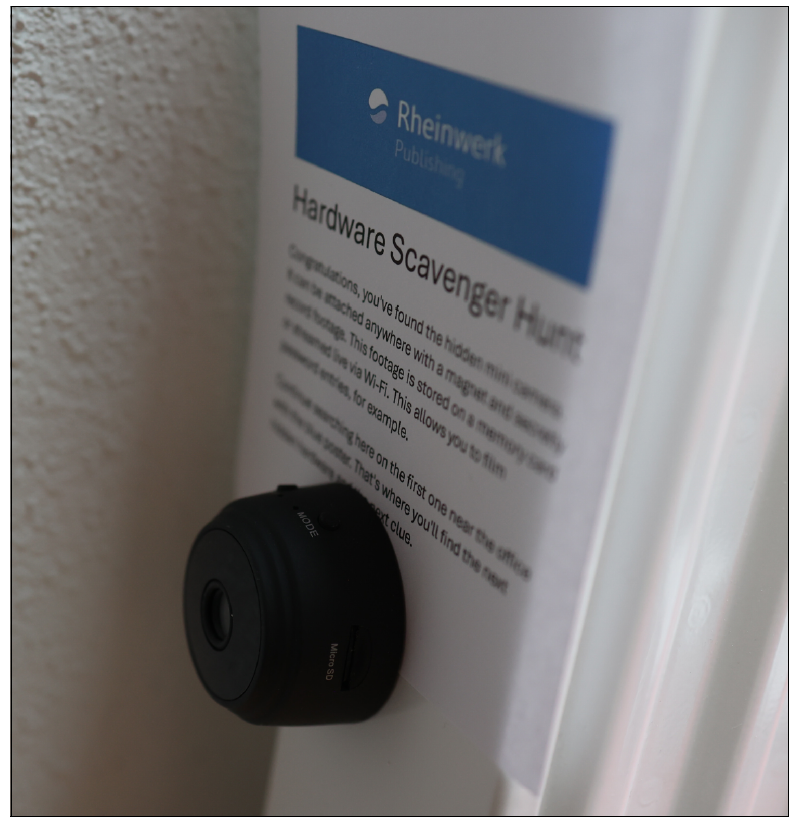
To increase motivation, introduce a playful element and incorporate a puzzle. Keep the instructions vague so that several destinations can be possible candidates for the next location. For example, you could mention a specific device nearby, such as a coffee machine or a printer. But only offer a few possibilities. If too many possible places exist, narrow the choices down. If the search takes too long, motivation will decrease. Therefore, the locations that come into question should not be too far apart.
You can make dealing with the topic of security even more effective by creating a brief story for each piece of hardware, perhaps a description of an attack scenario possible with the hardware, for example. This story then contains information on where to look for it.
### Several Teams
If you’re conducting this training with a larger group, set up competing teams. To make the sequence different for each team, you should use digital descriptions and leave only one codeword for the hardware tools instead. Then create a description for each piece of hardware in a separate document. As described earlier, brief stories described an attack scenario can also be used in this context. Each group is assigned a description at the start. All other descriptions are password protected and can only be opened once the previous hardware with the codeword has been found. The order of the descriptions is different for each team. You should choose neutral filenames, and the password protection must of course be set for each team according to the order, as shown in this figure.
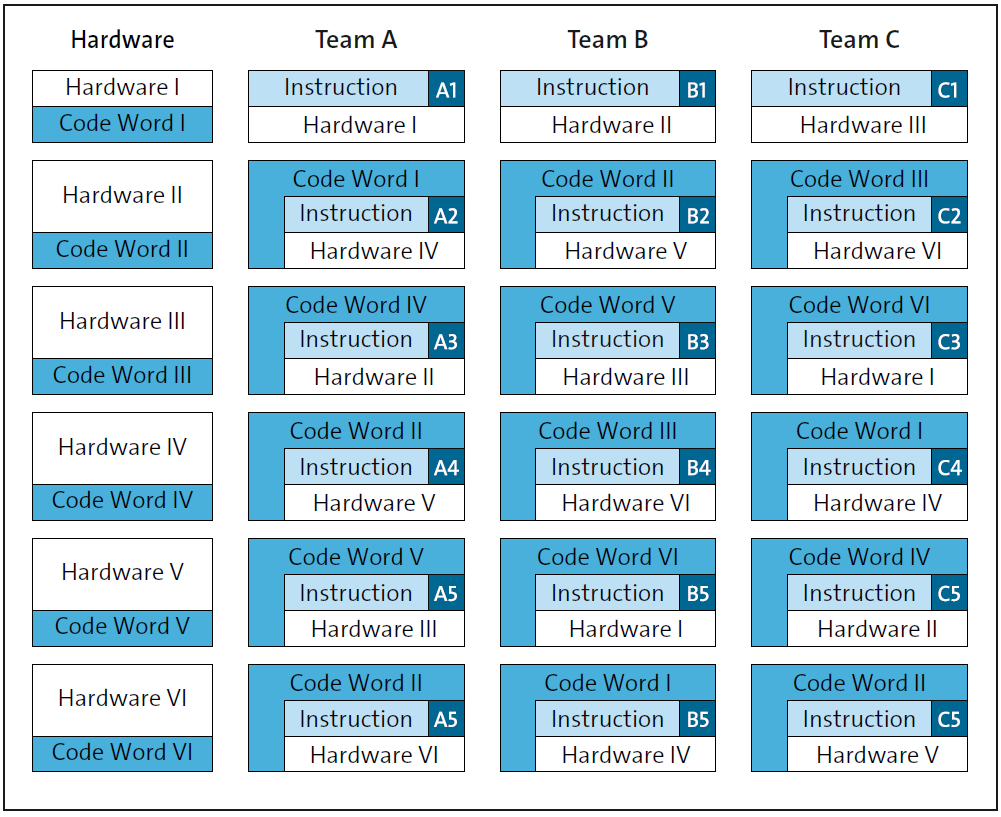
The teams could potentially pass codewords on to each other. To prevent this sharing and increase engagement with the hardware, you can use questions instead of codewords. For example, the description or task could include the question: “How many connections does the hardware you’ve just found have?” If the answer is too easy to guess, it can be combined with another word: “Hint: The password is structured as follows: Hardware\[number of interfaces\].” Then create a separate question for each piece of hardware and for each team.
## Execution
Hide the hardware with the hints or codewords before the actual start of the training. Start with a theoretical briefing and introduce the devices deployed so that your participants have an idea of what they look like.
Depending on the size of the group, you can either have several teams start at different times or use the methods described earlier. As soon as the hardware has been found, a group can switch to the next hardware. The groups move through the entire building and pursue several goals during the scavenger hunt, which enables participants to learn about the real-life application of pentest hardware.
## Conclusion
A hardware scavenger hunt transforms security awareness training from a passive learning experience into an active, memorable exercise. By placing real pentesting tools in realistic locations throughout the building, participants not only recognize what such devices look like but also understand how and where they could be used in a real attack scenario. The combination of movement, teamwork, and problem-solving reinforces technical knowledge while keeping motivation high.
Editor’s note: This post has been adapted from a section of the book *[Hacking Hardware: The Practical Guide to Penetration Testing](https://www.amazon.com/Hacking-Hardware-Hands-Pentesting-Prevention/dp/1493227718?maas=maas_adg_078897C479F9A93010E270939B87938F_afap_abs&ref_=aa_maas&tag=maas)* by [Tobias Scheible](https://www.linkedin.com/in/scheible/). Tobias taught and conducted research in the field of IT security at Albstadt-Sigmaringen University for more than eleven years.
This post was originally published 3/2026.
## Recommendation
[](https://www.amazon.com/Hacking-Hardware-Hands-Pentesting-Prevention/dp/1493227718?maas=maas_adg_078897C479F9A93010E270939B87938F_afap_abs&ref_=aa_maas&tag=maas)
**Secure Your System Against Hardware-Based Attacks!**
The best way to defend your hardware is to understand how attackers think. This guide walks you through real-world attack scenarios — USB killers, keyloggers, Wi-Fi manipulation, RFID exploits, and more — then shows you how to conduct penetration tests, run security awareness training, and put the right countermeasures in place to protect your infrastructure.
[Learn More](https://www.amazon.com/Hacking-Hardware-Hands-Pentesting-Prevention/dp/1493227718?maas=maas_adg_078897C479F9A93010E270939B87938F_afap_abs&ref_=aa_maas&tag=maas)

**by [Rheinwerk Computing](https://blog.rheinwerk-computing.com/author/rheinwerk-computing)**
Rheinwerk Computing is an imprint of Rheinwerk Publishing and publishes books by leading experts in the fields of programming, administration, security, analytics, and more.
[Featured](https://blog.rheinwerk-computing.com/tag/featured) [Cybersecurity](https://blog.rheinwerk-computing.com/tag/cybersecurity)
[](https://www.facebook.com/share.php?u=https%3A%2F%2Fblog.rheinwerk-computing.com%2Fsecurity-awareness-training-scenarios-hardware-scavenger-hunt%3Futm_medium%3Dsocial%26utm_source%3Dfacebook) [](https://www.linkedin.com/shareArticle?mini=true&url=https%3A%2F%2Fblog.rheinwerk-computing.com%2Fsecurity-awareness-training-scenarios-hardware-scavenger-hunt%3Futm_medium%3Dsocial%26utm_source%3Dlinkedin) [](https://twitter.com/intent/tweet?original_referer=https%3A%2F%2Fblog.rheinwerk-computing.com%2Fsecurity-awareness-training-scenarios-hardware-scavenger-hunt%3Futm_medium%3Dsocial%26utm_source%3Dtwitter&url=https%3A%2F%2Fblog.rheinwerk-computing.com%2Fsecurity-awareness-training-scenarios-hardware-scavenger-hunt%3Futm_medium%3Dsocial%26utm_source%3Dtwitter&source=tweetbutton&text=) [](mailto:?subject=Check+out+https%3A%2F%2Fblog.rheinwerk-computing.com%2Fsecurity-awareness-training-scenarios-hardware-scavenger-hunt%3Futm_medium%3Dsocial%26utm_source%3Demail&body=Check+out+https%3A%2F%2Fblog.rheinwerk-computing.com%2Fsecurity-awareness-training-scenarios-hardware-scavenger-hunt%3Futm_medium%3Dsocial%26utm_source%3Demail)
### Comments
### Latest Blog Posts
[](https://blog.rheinwerk-computing.com/security-awareness-training-scenarios-contaminated-workplace)
[Administration](https://blog.rheinwerk-computing.com/tag/administration)
## [Security Awareness Training Scenarios, Part 1: Contaminated Workplace](https://blog.rheinwerk-computing.com/security-awareness-training-scenarios-contaminated-workplace)
[Read More](https://blog.rheinwerk-computing.com/security-awareness-training-scenarios-contaminated-workplace)
[](https://blog.rheinwerk-computing.com/security-awareness-training-scenarios-part-3-usb-drives-in-public-areas)
[Featured](https://blog.rheinwerk-computing.com/tag/featured)
## [Security Awareness Training Scenarios, Part 3: USB Drives in Public Areas](https://blog.rheinwerk-computing.com/security-awareness-training-scenarios-part-3-usb-drives-in-public-areas)
[Read More](https://blog.rheinwerk-computing.com/security-awareness-training-scenarios-part-3-usb-drives-in-public-areas)
**Subscribe to our blog!**Get notified about future blog updates.
-
-
-
### The official Rheinwerk Computing Blog
Rheinwerk Computing is an imprint of Rheinwerk Publishing and publishes resources that will help you accelerate your computing journey. The Rheinwerk Computing Blog is designed to provide helpful, actionable information on a variety of topics, including programming, administration, security, and analytics!
### Blog Topics
- [All Topics](https://blog.rheinwerk-computing.com)
- [Programming Languages](https://blog.rheinwerk-computing.com/tag/programming-languages)
- [How To](https://blog.rheinwerk-computing.com/tag/how-to)
- [JavaScript](https://blog.rheinwerk-computing.com/tag/javascript)
- [DevOps](https://blog.rheinwerk-computing.com/tag/devops)
- [Web Development](https://blog.rheinwerk-computing.com/tag/web-development)
- [Python](https://blog.rheinwerk-computing.com/tag/python)
- [What Is?](https://blog.rheinwerk-computing.com/tag/what-is)
- [Cybersecurity](https://blog.rheinwerk-computing.com/tag/cybersecurity)
- [Software Development](https://blog.rheinwerk-computing.com/tag/software-development)
- [Java](https://blog.rheinwerk-computing.com/tag/java)
### Blog curated by
[](https://www.sap-press.com/rheinwerk-computing/) [Visit Rheinwerk Computing Store](https://www.sap-press.com/rheinwerk-computing/)
### About
- [Home](https://sap-press.com/)
- [About Us](https://sap-press.com/the-publisher/)
- [Contact](mailto:info@rheinwerk-publishing.com)
- [Legal Notes](https://sap-press.com/legal-notes/)
- [Privacy Policy](https://sap-press.com/privacy/)
- [Terms of Use](https://sap-press.com/terms/)
© 2026 Rheinwerk Publishing, Inc. | Change Privacy Options
```json
{
"@context" : "https://schema.org",
"@type" : "BlogPosting",
"author" : {
"@type" : "Person",
"name" : "Rheinwerk Computing",
"url" : "https://blog.rheinwerk-computing.com/author/rheinwerk-computing"
},
"dateModified" : "2026-03-20T13:35:33.433Z",
"datePublished" : "2026-03-18T13:00:01.000Z",
"headline" : "Security Awareness Training Scenarios, Part 2: Hardware Scavenger Hunt",
"image" : [ "https://blog.rheinwerk-computing.com/hubfs/Security%20Awareness%20Training%20Scenarios%2c%20Part%202_%20Hardware%20Scavenger%20Hunt.jpg" ],
"mainEntityOfPage" : {
"@id" : "https://blog.rheinwerk-computing.com/security-awareness-training-scenarios-hardware-scavenger-hunt",
"@type" : "WebPage"
},
"publisher" : {
"@type" : "Organization",
"logo" : {
"@type" : "ImageObject",
"url" : "https://blog.rheinwerk-computing.com/hubfs/Logo-1.jpg"
},
"name" : "Rheinwerk Publishing, Inc."
}
}
```