---
title: "Security Awareness Training Scenarios, Part 1: Contaminated Workplace"
description: Learn how to run a hands-on security awareness training scenario that simulates a contaminated workplace, where participants hide and detect malicious hardware.
image: https://blog.rheinwerk-computing.com/hubfs/Security%20Awareness%20Training%20Scenarios%2c%20Part%201_%20Contaminated%20Workplace.jpg
---
[](https://blog.rheinwerk-computing.com/) [Blog](https://blog.rheinwerk-computing.com)
- Books
- Get an overview of our wide selection of books on every relevant computing topic.
- [General Computing](https://www.sap-press.com/rheinwerk-computing/general-computing/)
- [DevOps](https://www.sap-press.com/rheinwerk-computing/devops/)
- [Programming Languages](https://www.sap-press.com/rheinwerk-computing/programming-languages/)
- [Security](https://www.sap-press.com/rheinwerk-computing/security/)
- [Software Development](https://www.sap-press.com/rheinwerk-computing/software-development/)
- Book Subscription
- Get unlimited access to all Rheinwerk Computing books!
- [Programming Subscription](https://sap-press.com/subscriptions/)
[Administration](https://blog.rheinwerk-computing.com/tag/administration)
# Security Awareness Training Scenarios, Part 1: Contaminated Workplace
 by [Rheinwerk Computing](https://blog.rheinwerk-computing.com/author/rheinwerk-computing)
Security awareness training is most effective when participants can experience threats in a realistic, hands-on environment.
In the “contaminated workplace” scenario is an office set up with one or more computer workstations equipped with pentest hardware. Basically, offices with many different devices and open cabling are best suited to this scenario. After an introduction, participants are divided into two groups: One group must hide the hardware tools; the other group must find them afterwards.
For this scenario, you can use all hardware tools that are connected to a client computer. These devices include keyloggers, screen loggers, devices for local area network (LAN) interfaces, and other various spy gadgets.
## Preparation
Basically, you do not require major preparations for this scenario. In theory, you can simply distribute the pentest hardware (without configuring it). This setup is sufficient for the objective, that is, to detect the hardware. However, an interesting later evaluation could involve active hardware.
In particular, you can deploy spy gadgets, as shown in this figure, that record the audio and video in a room.
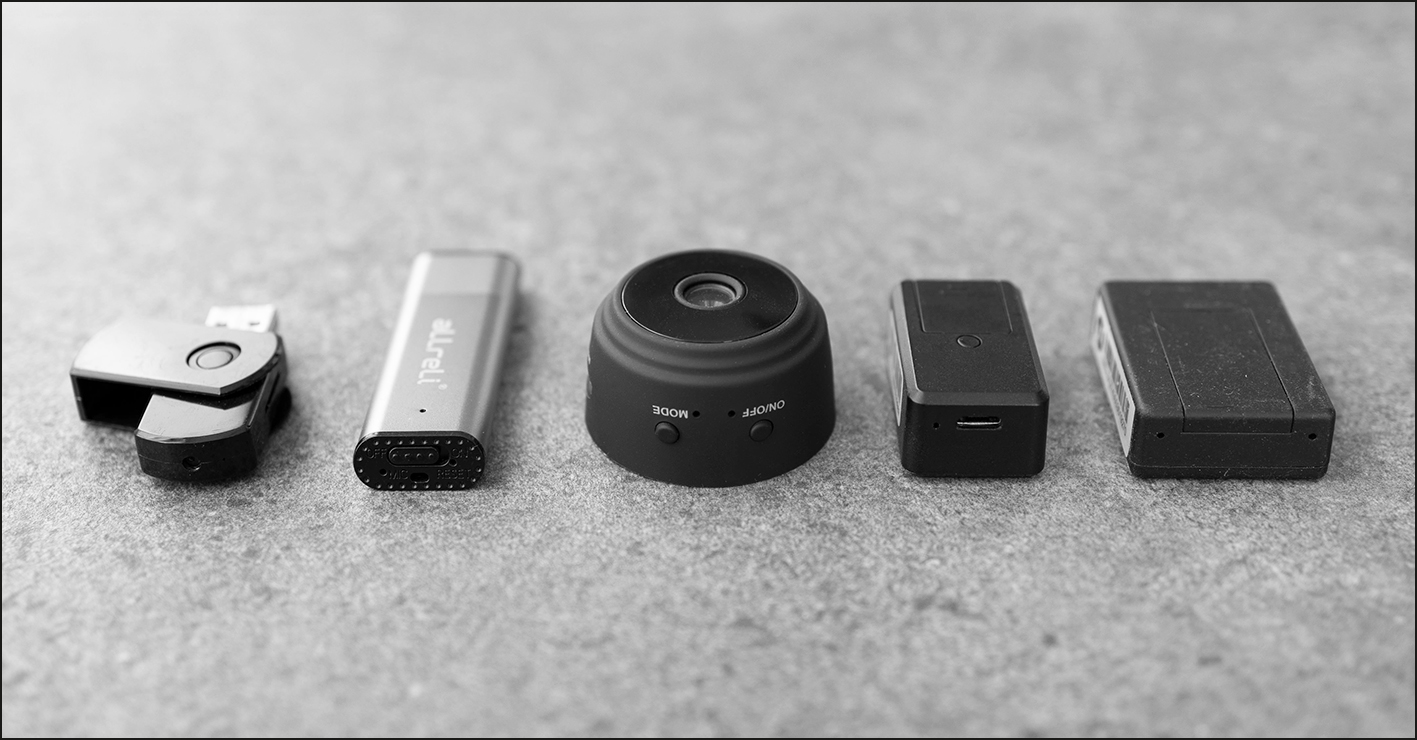
If you actively use these devices, you should clarify with the participants in advance that recordings will be made. These gadgets can be often installed regardless of the location of a computer, allowing the group that hides these tools to operate rather flexibly.
Some devices only have a small battery. To make the scenario more realistic, you can also connect power supply units.
Next prepare the pentest hardware to be connected to a computer. This figure shows a selection of keyloggers and screen loggers, which are smuggled directly between the computer and the keyboard or monitor and are of course suitable in this context.
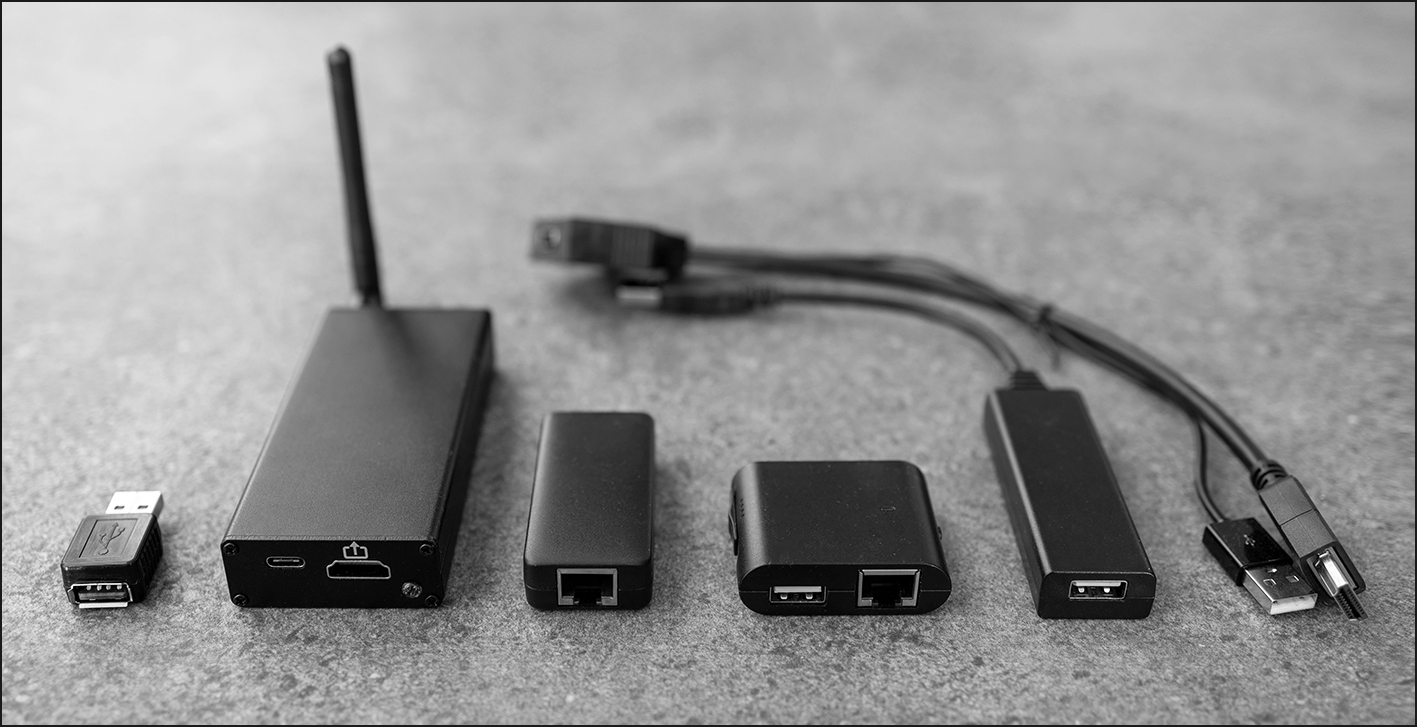
In addition, you can prepare various LAN tools that are attached to the LAN cable connection and compromise the network. In this case, however, you should configure the training network so that no access to networks used in production is possible. Perhaps all you need is a router to create a small training network as a playground.
## Variations
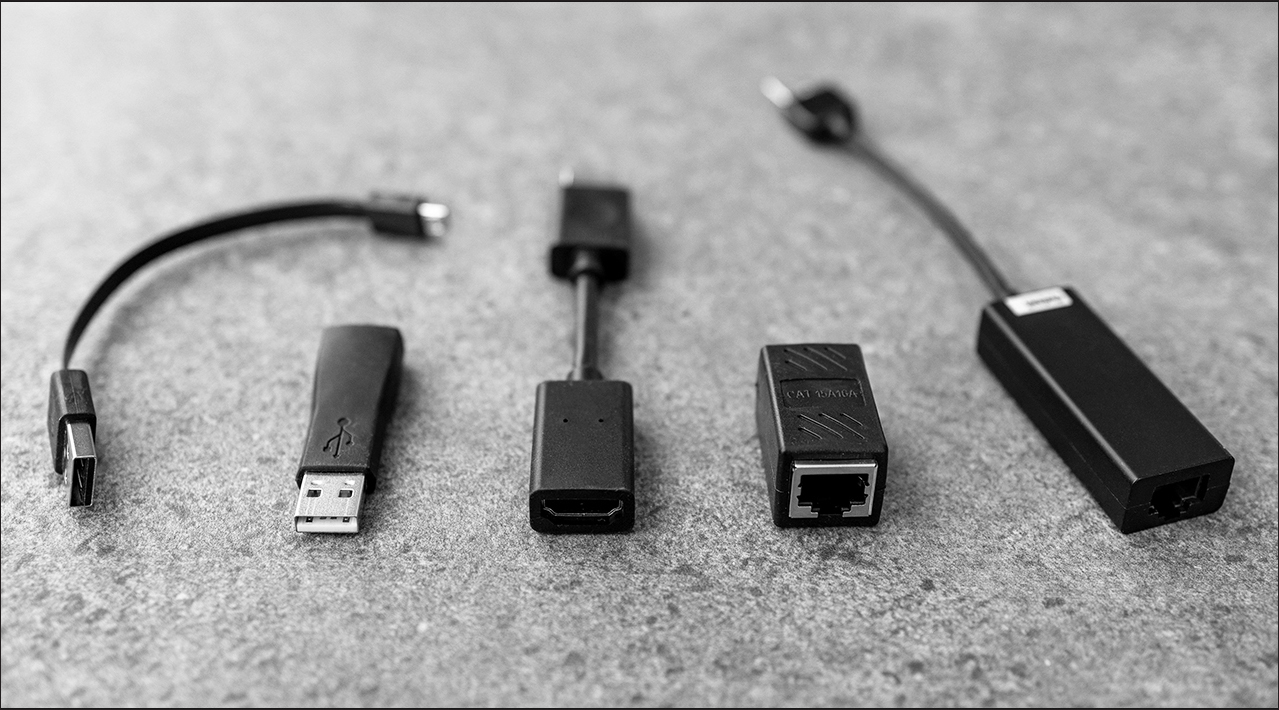
If you want to enhance the difficulty of the training even further, use hardware that you have not presented in advance. However, your choices should be similar to the tools you present so that participants can transfer what they have learned. For example, you could hide a keylogger that is structured and configured differently to the keylogger you present, as shown in the next figure. With this challenge, participants reach a higher level of understanding because they transfer knowledge from something they’ve learned to a new scenario.

To further enhance the challenge, use devices in specialist groups that share a common function but look rather unusual, for example, all types of adapters and cable extensions for USB and for RJ45 Ethernet, as shown here.
## Execution
First, start by conducting the theoretical training and introducing the various hardware tools to all participants. Then divide the participants into two equal groups. Next go with the first group to the previously prepared office. Give the participants the hardware with the task of hiding it as inconspicuously as possible. Depending on the size of the group, you can build groups of two or more and give them one or more devices. In the process, discuss with these participants how the tools can be hidden as efficiently as possible. As soon as all the devices have been placed, this group leaves the office again and can take a coffee break.
Then fetch the second group and accompany them to the office. Give this group the task of finding as many hardware devices as possible that may have malicious intent. If the participants are not sure whether an item is the hardware they are looking for, let them discuss it among themselves first. If necessary—for example, no progress is made at all for a while—offer some tips on what kind of hardware can still be sought.
To make the exercise more relevant to real life, tell the second group to leave the hardware tools they have found in place. You can then demonstrate to both groups what data can be intercepted with these tools. For this part, make a few entries on the keyboard and access multiple websites. Then read the contents of the keyloggers and screen loggers and show them to the participants. You can also show them the audio and video recordings gathered by the spy gadgets.
## Conclusion
The contaminated workplace scenario demonstrates that security risks are not limited to software and phishing emails—physical hardware threats can be just as dangerous and far more difficult to detect. By actively hiding and uncovering malicious devices, participants develop a sharper eye for suspicious equipment and a deeper understanding of how easily workplace environments can be compromised. This practical experience not only increases awareness but also encourages a culture of attentiveness, critical thinking, and shared responsibility for organizational security.
Editor’s note: This post has been adapted from a section of the book [Hacking Hardware: The Practical Guide to Penetration Testing](https://www.amazon.com/Hacking-Hardware-Hands-Pentesting-Prevention/dp/1493227718?maas=maas_adg_078897C479F9A93010E270939B87938F_afap_abs&ref_=aa_maas&tag=maas) by [Tobias Scheible](https://www.linkedin.com/in/scheible/). Tobias taught and conducted research in the field of IT security at Albstadt-Sigmaringen University for more than eleven years.
This post was originally published 1/2026.
## Recommendation
[](https://www.amazon.com/Hacking-Hardware-Hands-Pentesting-Prevention/dp/1493227718?maas=maas_adg_078897C479F9A93010E270939B87938F_afap_abs&ref_=aa_maas&tag=maas)
**Secure Your System Against Hardware-Based Attacks!**
The best way to defend your hardware is to understand how attackers think. This guide walks you through real-world attack scenarios — USB killers, keyloggers, Wi-Fi manipulation, RFID exploits, and more — then shows you how to conduct penetration tests, run security awareness training, and put the right countermeasures in place to protect your infrastructure.
[Learn More](https://www.amazon.com/Hacking-Hardware-Hands-Pentesting-Prevention/dp/1493227718?maas=maas_adg_078897C479F9A93010E270939B87938F_afap_abs&ref_=aa_maas&tag=maas)

**by [Rheinwerk Computing](https://blog.rheinwerk-computing.com/author/rheinwerk-computing)**
Rheinwerk Computing is an imprint of Rheinwerk Publishing and publishes books by leading experts in the fields of programming, administration, security, analytics, and more.
[Administration](https://blog.rheinwerk-computing.com/tag/administration) [Featured](https://blog.rheinwerk-computing.com/tag/featured) [Cybersecurity](https://blog.rheinwerk-computing.com/tag/cybersecurity)
[](https://www.facebook.com/share.php?u=https%3A%2F%2Fblog.rheinwerk-computing.com%2Fsecurity-awareness-training-scenarios-contaminated-workplace%3Futm_medium%3Dsocial%26utm_source%3Dfacebook) [](https://www.linkedin.com/shareArticle?mini=true&url=https%3A%2F%2Fblog.rheinwerk-computing.com%2Fsecurity-awareness-training-scenarios-contaminated-workplace%3Futm_medium%3Dsocial%26utm_source%3Dlinkedin) [](https://twitter.com/intent/tweet?original_referer=https%3A%2F%2Fblog.rheinwerk-computing.com%2Fsecurity-awareness-training-scenarios-contaminated-workplace%3Futm_medium%3Dsocial%26utm_source%3Dtwitter&url=https%3A%2F%2Fblog.rheinwerk-computing.com%2Fsecurity-awareness-training-scenarios-contaminated-workplace%3Futm_medium%3Dsocial%26utm_source%3Dtwitter&source=tweetbutton&text=) [](mailto:?subject=Check+out+https%3A%2F%2Fblog.rheinwerk-computing.com%2Fsecurity-awareness-training-scenarios-contaminated-workplace%3Futm_medium%3Dsocial%26utm_source%3Demail&body=Check+out+https%3A%2F%2Fblog.rheinwerk-computing.com%2Fsecurity-awareness-training-scenarios-contaminated-workplace%3Futm_medium%3Dsocial%26utm_source%3Demail)
### Comments
### Latest Blog Posts
[](https://blog.rheinwerk-computing.com/security-awareness-training-scenarios-hardware-scavenger-hunt)
[Featured](https://blog.rheinwerk-computing.com/tag/featured)
## [Security Awareness Training Scenarios, Part 2: Hardware Scavenger Hunt](https://blog.rheinwerk-computing.com/security-awareness-training-scenarios-hardware-scavenger-hunt)
[Read More](https://blog.rheinwerk-computing.com/security-awareness-training-scenarios-hardware-scavenger-hunt)
[](https://blog.rheinwerk-computing.com/security-awareness-training-scenarios-part-3-usb-drives-in-public-areas)
[Featured](https://blog.rheinwerk-computing.com/tag/featured)
## [Security Awareness Training Scenarios, Part 3: USB Drives in Public Areas](https://blog.rheinwerk-computing.com/security-awareness-training-scenarios-part-3-usb-drives-in-public-areas)
[Read More](https://blog.rheinwerk-computing.com/security-awareness-training-scenarios-part-3-usb-drives-in-public-areas)
**Subscribe to our blog!**Get notified about future blog updates.
-
-
-
### The official Rheinwerk Computing Blog
Rheinwerk Computing is an imprint of Rheinwerk Publishing and publishes resources that will help you accelerate your computing journey. The Rheinwerk Computing Blog is designed to provide helpful, actionable information on a variety of topics, including programming, administration, security, and analytics!
### Blog Topics
- [All Topics](https://blog.rheinwerk-computing.com)
- [Programming Languages](https://blog.rheinwerk-computing.com/tag/programming-languages)
- [How To](https://blog.rheinwerk-computing.com/tag/how-to)
- [JavaScript](https://blog.rheinwerk-computing.com/tag/javascript)
- [DevOps](https://blog.rheinwerk-computing.com/tag/devops)
- [Web Development](https://blog.rheinwerk-computing.com/tag/web-development)
- [Python](https://blog.rheinwerk-computing.com/tag/python)
- [What Is?](https://blog.rheinwerk-computing.com/tag/what-is)
- [Cybersecurity](https://blog.rheinwerk-computing.com/tag/cybersecurity)
- [Software Development](https://blog.rheinwerk-computing.com/tag/software-development)
- [Java](https://blog.rheinwerk-computing.com/tag/java)
### Blog curated by
[](https://www.sap-press.com/rheinwerk-computing/) [Visit Rheinwerk Computing Store](https://www.sap-press.com/rheinwerk-computing/)
### About
- [Home](https://sap-press.com/)
- [About Us](https://sap-press.com/the-publisher/)
- [Contact](mailto:info@rheinwerk-publishing.com)
- [Legal Notes](https://sap-press.com/legal-notes/)
- [Privacy Policy](https://sap-press.com/privacy/)
- [Terms of Use](https://sap-press.com/terms/)
© 2026 Rheinwerk Publishing, Inc. | Change Privacy Options
```json
{
"@context" : "https://schema.org",
"@type" : "BlogPosting",
"author" : {
"@type" : "Person",
"name" : "Rheinwerk Computing",
"url" : "https://blog.rheinwerk-computing.com/author/rheinwerk-computing"
},
"dateModified" : "2026-03-13T15:39:20.702Z",
"datePublished" : "2026-01-28T14:00:01.000Z",
"headline" : "Security Awareness Training Scenarios, Part 1: Contaminated Workplace",
"image" : [ "https://blog.rheinwerk-computing.com/hubfs/Security%20Awareness%20Training%20Scenarios%2c%20Part%201_%20Contaminated%20Workplace.jpg" ],
"mainEntityOfPage" : {
"@id" : "https://blog.rheinwerk-computing.com/security-awareness-training-scenarios-contaminated-workplace",
"@type" : "WebPage"
},
"publisher" : {
"@type" : "Organization",
"logo" : {
"@type" : "ImageObject",
"url" : "https://blog.rheinwerk-computing.com/hubfs/Logo-1.jpg"
},
"name" : "Rheinwerk Publishing, Inc."
}
}
```