

Convolutional neural networks process images very differently from the fully connected networks.
Instead of treating every pixel as an independent input, CNNs use convolutional layers to detect local patterns such as edges, textures, and shapes across an image. In this post, we’ll introduce the Conv2D layer, explore how filters slide across images to produce feature maps, and build an intuitive understanding of how strides, channels, and learned filters shape the flow of information through a convolutional network.
Related: What Is a Convolutional Neural Network?
How Convolutional Filters Create Feature Maps
Each filter slides across the input image, performing its convolution operation at each position. The result isn’t a single number but another “image”—a feature map that highlights where certain patterns appear in the original image. If our filter is designed to detect vertical edges, the output feature map will light up wherever those edges appear. The shape of these feature maps depends on several factors: the input size, filter size, and something new called stride, which is how many pixels we move each time we slide our filter.
Understanding Stride and Output Size
Let’s work through some examples to make this concrete: Assume we have a simple 5×5 input image and a 3×3 filter, as shown in this figure.
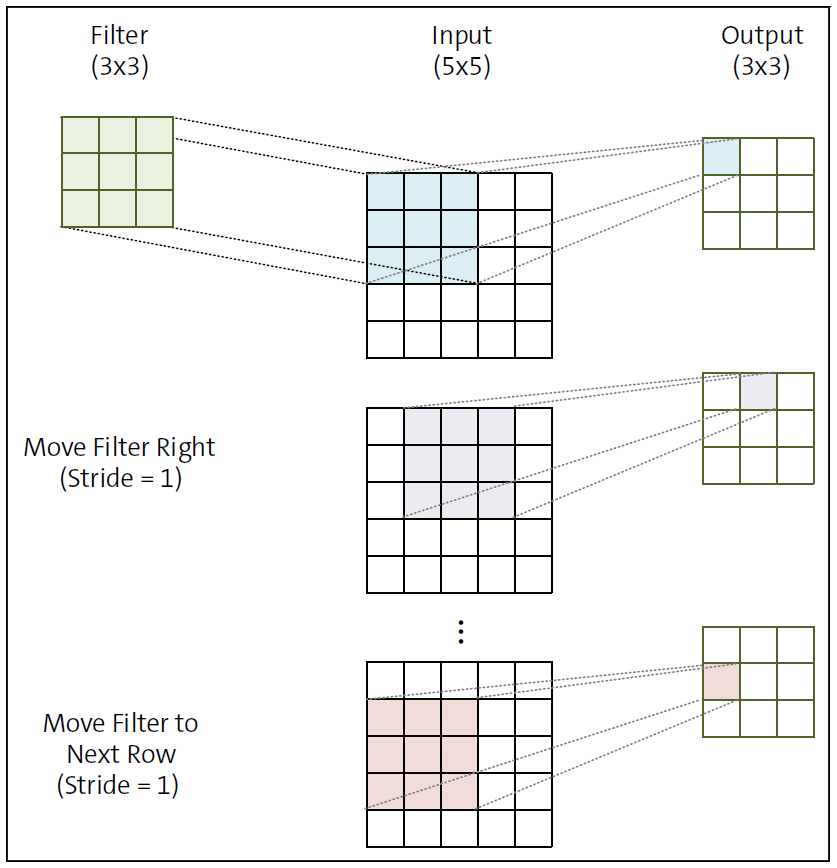
If we use a stride of 1—moving our filter 1 pixel at a time—how large will our output feature map be? Starting at the top-left corner, we can place our 3×3 filter on positions (0,0), (0,1), (0,2), then to the next row as (1,0), and so on. The last valid position would be (2,2) because if we go any further, our filter would extend beyond the input image. This gives us a 3×3 output feature map (3 positions horizontally × 3 positions vertically).
Now, let’s scale up to a real example. If we have a 28×28 MNIST digit image and apply a 3×3 filter with a stride of 1, our output shape becomes 26×26. We can position our filter at coordinates (0,0) through (25,25) for a total of 26 positions in each dimension. The output shrinks because our filter needs to fit completely within the input image.
What if we use a stride of 2, jumping 2 pixels each time we move our filter? This cuts our output dimensions roughly in half. With our 28×28 input, the filter positions would be (0,0), (0,2), (0,4), and so on. This gives us a 13×13 output feature map. We can verify this: starting from 0, we can jump by two 13 times (0, 2, 4, 6, 8, 10, 12, 14, 16, 18, 20, 22, 24) while keeping our 3×3 filter within the 28×28 image. Keras calculates this output size automatically for us, but you need to spend some time understanding it to avoid any debugging headaches when you get to larger networks.
Using Multiple Filters to Create Channels
Let’s do something a little more interesting and closer to the real world. Instead of using just one filter, we can apply multiple filters to the same input image. Each filter searches for different patterns—perhaps one detects horizontal edges, another vertical edges, and a third diagonal lines. If we apply two different filters to our 28×28 MNIST image with a stride of 1, we get two 26×26 feature maps. We can stack these maps together to form a 26×26×2 output. That third dimension—2, in this case—is what we call the number of channels or feature maps. This is conceptually similar to how color images work. A color image typically has three channels—red, green, and blue—stacked together. But in convolutional layers, each channel represents a different feature detected by a unique filter.
From Handcrafted Filters to Learned Features
So far, we’ve been applying convolution with filters that have predefined values—like our edge detectors and blurring filters. What if we let the network itself discover what filters would be most useful?
When we build a CNN, we don’t actually program the specific values in each filter. Instead, we initialize these values randomly—essentially starting with filters that do nothing meaningful. One filter might randomly brighten some pixels and darken others in a chaotic pattern. Another might create strange, haphazard distortions.
This might seem counterintuitive. How can random noise possibly help us classify images? The key lies in what happens next. Once we’ve initialized our random filters, we push an image through our network on the forward pass. The image gets transformed by each convolutional layer, with each filter extracting meaningless patterns (at first). Eventually, after passing through several layers, the network makes a prediction about what’s in the image.
In the beginning, this prediction is almost certainly wrong. A network trying to recognize handwritten digits might confidently declare that an 8 is actually a 1—it’s basically guessing randomly because its filters haven’t learned anything yet.
But here’s the crucial part: We calculate how wrong the network is (the loss), and then we propagate this error backward through the network. This backward pass calculates how each filter value contributed to the mistake, and then—drawing on the gradient descent algorithm—it adjusts these values in the direction that reduces the error. Remember the core idea of gradient descent? We find the gradient (the direction of steepest increase) of our loss function with respect to each parameter and then take a small step in the opposite direction to reduce the loss. This same principle applies here, but now our parameters are the values in each convolutional filter.
After this adjustment, each filter changes slightly, moving a tiny bit closer to extracting a pattern that’s actually useful for the classification task. We repeat this process thousands of times with many examples, and gradually, these initially random filters transform into purposeful feature detectors.
Some filters might indeed evolve to detect edges, just like the ones we designed manually. Others might become specialized for detecting curves, corners, textures, or more abstract patterns that humans might not even recognize as meaningful. The network discovers what features are most useful for distinguishing between the classes it’s trying to predict. It’s like letting a group of artists discover their own styles through trial and error. We don’t tell them exactly what techniques to use; they figure out what works best through practice and feedback.
Why Convolutional Layers Use Sparse Connectivity
This approach of learning filters through gradient descent combines the best of both worlds. We get the benefit of sparse connectivity—each output value depends only on a small neighborhood of input pixels, not the entire image. This dramatically reduces the number of parameters compared to fully connected networks. At the same time, we’re using better activation functions such as ReLU that don’t squash gradients to microscopic values. This helps the learning signal propagate more effectively through the network, especially as we add more layers. The result is a network that can learn much faster and more effectively than its fully connected counterparts. It uses the inherent structure of images—the fact that nearby pixels are related and distant ones less so—while still discovering the features that matter most for the specific task at hand.
Understanding Image Channels and Tensor Shapes
We’ve been working with simple matrices as our inputs, which is perfect for grayscale images where each pixel has just one intensity value. But the colorful world around us demands more nuance. This is where channels come in as the secret ingredient that adds richness and depth to our image representation.
Think about how your digital camera captures a sunset. It doesn’t simply record a single value for each point in the scene. It captures separate intensity values for red, green, and blue light. These three primary colors, when combined in different proportions, can recreate virtually any color our eyes can perceive.
In an RGB image, each pixel location doesn’t hold just one value but three:
- The red channel records how much red light is present at each position.
- The green channel captures the intensity of green.
- The blue channel measures the blue component.
When we stack these three matrices together, we get a more complex structure—a 3D array that computer scientists call a tensor. It’s having three separate but aligned grayscale images, each one capturing a different aspect of the scene.
An Example of Channels
In a picture of a vibrant red apple, the pixels in the red channel have high values, while the green and blue channels show lower values. The sky portion of an image might have high values in the blue channel but lower values in the red and green channels. You can actually look at these channels in any photo editor. I highly recommend you try doing that to get a deeper understanding of how they are represented.
This shift from a simple matrix to a multi-channel tensor requires us to think more carefully about how we organize our data. If our image is 28×28 pixels with three color channels, we’re actually working with a tensor of 28×28×3 values.
But things can get a bit tricky here. Different deep learning frameworks organize these dimensions in different ways. TensorFlow and Keras (which we’ll be using) typically organize image tensors in the shape of (Height, Width, Channels), also known as the HWC format, so our example is a tensor of shape (28, 28, 3). Some libraries use the (Channels, Height, Width) convention, also known as CHW. In that case, the shape will become (3, 28, 28). This ordering might seem arbitrary, but it’s crucial to keep track of it. When you’re debugging shape errors (and trust me, you’ll encounter these), the first thing to check is whether you’re aligning your dimensions correctly. Always pay attention to the shape information in error messages and when printing tensor shapes as this information is a compass that helps you navigate through the multidimensional landscape of your model.
How Convolution Works Across Multiple Channels
Now that our inputs have become three-dimensional, our filters need to match. When working with a multi-channel input, each filter must have the exact same number of channels as the input, as shown in the figure below. For an RGB image, this means each filter becomes a 3D tensor itself. If we’re using a 3×3 filter, it actually becomes a 3×3×3 filter—the extra dimension corresponding to the three color channels. You can visualize this as three separate 3×3 filters, one for each channel, working together as a single unit. How does convolution work with these 3D tensors? The process, shown concisely, is a natural extension of what we’ve already learned.
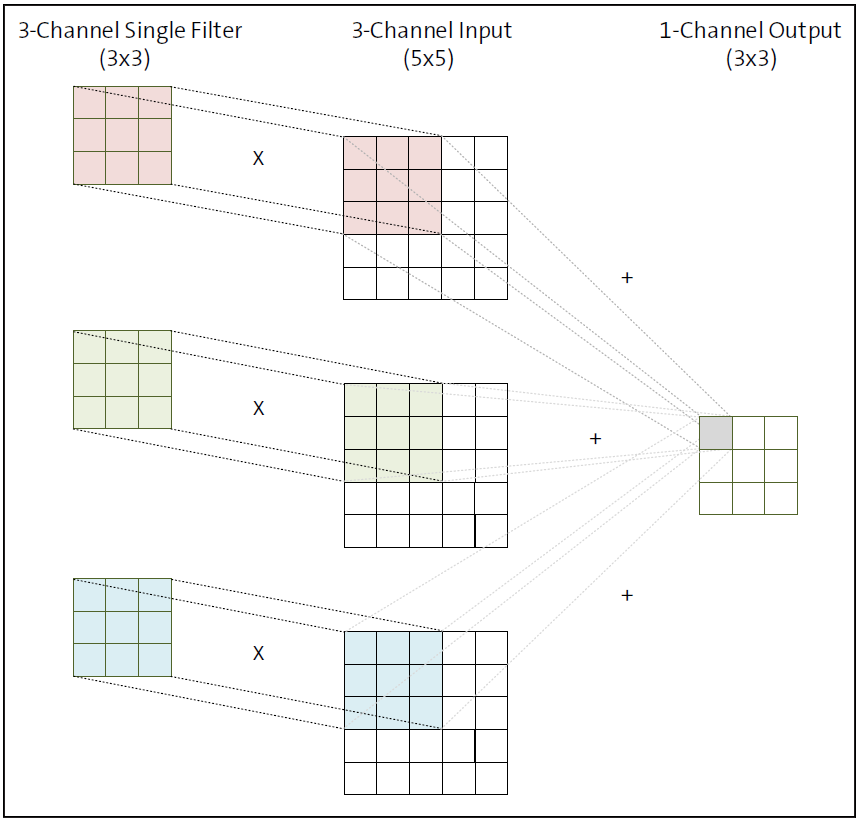
When applying a three-channel filter to a three-channel input, we do the following:
- Position the filter at a location in the image.
- For each channel, multiply the filter values with the corresponding input values.
- Sum up all of these products—not just across each 2D slice but across all three channels.
- Recognize that this single scalar value becomes one element in our output feature map.
Contrast this operation with the single channel one shown previously. This is a crucial point: No matter how many channels our input has, a single filter always produces a single channel in the output. The multi-channel filter collapses the input channels into a single value at each position. In addition, if the input is a three-channel one, the filter applied to it must also be a made of three channels.
If we want our output to have multiple channels, we need to apply multiple filters. Each filter creates its own feature map, and these maps stack together to form a multi-channel output.
Let’s consider the concrete example. We have an RGB input image of shape (5, 5, 3)—5 pixels tall, 5 pixels wide, with three color channels. We apply a 3×3×3 filter with a stride of 1. The output will be a single-channel feature map of shape (3, 3, 1). If we add a second 3×3×3 filter, we get two single-channel feature maps, which stack to create an output of shape (3, 3, 2). An interactive demo of three-channel convolution is available on the book resources page at https://recluze.net/keras-book in the link 07-06-conv-3-channel-demo and on the book’s official web page.
Implementing Multi-Channel Convolution in Code
Refer to these code snippets:
from io import BytesIO
import numpy as np
import matplotlib.pyplot as plt
from PIL import Image
import requests
# Load image from URL
url = "https://recluze.net/kb/building.jpeg"
response = requests.get(url)
img = Image.open(BytesIO(response.content))
# Convert to grayscale
gray_img = img.convert('L')
img_array = np.array(gray_img)
---------
# If you want to try different kernels, you can use this function
def apply_kernel(kernel_name):
if kernel_name in kernels:
result = apply_convolution(img_array, kernels[kernel_name])
result = np.clip(result, 0, 255).astype(np.uint8)
plt.figure(figsize=(10, 5))
plt.subplot(1, 2, 1)
plt.imshow(img_array, cmap='gray')
plt.title('Grayscale Image')
plt.axis('off')
plt.subplot(1, 2, 2)
plt.imshow(result, cmap='gray')
plt.title(f'After {kernel_name.replace("_", " ").title()} Filter')
plt.axis('off')
plt.tight_layout()
plt.show()
return result
else:
print(f"Kernel '{kernel_name}' not found.")
---------
def apply_convolution(image, kernel):
# Get dimensions
image_height, image_width = image.shape
kernel_height, kernel_width = kernel.shape
# Calculate padding
pad_height = kernel_height // 2
pad_width = kernel_width // 2
# Create output array
output = np.zeros_like(image)
# Apply padding to the input image
padded_image = np.pad(image, ((pad_height, pad_height), \
(pad_width, pad_width)), mode='constant')
# ... function continues in next listing
---------
# Apply convolution
for i in range(image_height):
for j in range(image_width):
# Extract the region of interest
region = padded_image[i:i+kernel_height, \
j:j+kernel_width]
# Apply the kernel
output[i, j] = np.sum(region * kernel)
return output
kernels = {
'identity': np.array([[0, 0, 0], [0, 1, 0], [0, 0, 0]]),
'edge_detection': np.array([[-1, -1, -1], [-1, 8, -1], [-1, -1, -1]]),
'sharpen': np.array([[0, -1, 0], [-1, 2, -1], [0, -1, 0]]),
'gaussian_blur': np.array([[1, 2, 1], [2, 4, 2], [1, 2, 1]]) / 16,
}
result = apply_kernel('gaussian_blur')
We can modify it to use a threechannel input instead. When we load the image, we make a minor change so that the image isn’t converted to grayscale. The code will look like this.
# Load image from URL
url = "https://recluze.net/kb/building.jpeg"
response = requests.get(url)
img = Image.open(BytesIO(response.content))
# Convert to numpy array (now with 3 channels)
img_array = np.array(img)
The apply_kernel function remains the same but the apply_convolution function is updated to that shown. This code creates a convolution operation that performs channel mixing across a color image. It starts by preparing a single-channel output array, recognizing that we’re transforming a multi-channel image into a grayscale result. Each color channel gets padded individually and stored in a list for processing. Then comes the heart of the operation—nested loops that visit every pixel position in the image. At each position, the code extracts regions from all color channels, applies the same kernel to each one, and accumulates their contributions into a single sum.
This channel mixing is like blending ingredients in a recipe—information from red, green, and blue channels combines to create a single, rich output value. When a filter finds a pattern in any channel, it contributes to the final result. This approach mirrors how convolutional layers in neural networks often work, where a single filter produces one feature map by integrating information across all input channels.
The final output represents the collective response of all channels to the filter pattern, capturing the essence of the image’s structure in a single grayscale representation.
def apply_convolution_rgb(image, kernel):
# Get dimensions and calculate padding as before.
# Create single-channel output array
output = np.zeros((image_height, image_width))
# Pad each channel
padded_channels = []
for c in range(channels):
padded_channel = np.pad(image[:,:,c],
((pad_height, pad_height),
(pad_width, pad_width)),
mode='constant')
padded_channels.append(padded_channel)
# Apply convolution with channel mixing
for i in range(image_height):
for j in range(image_width):
pixel_sum = 0
# Sum contributions from all channels
for c in range(channels):
# Extract the region of interest
region = padded_channels[c][i:i+kernel_height,
j:j+kernel_width]
# Apply the kernel and add to running sum
pixel_sum += np.sum(region * kernel)
# Store the combined result
output[i, j] = pixel_sum
return output
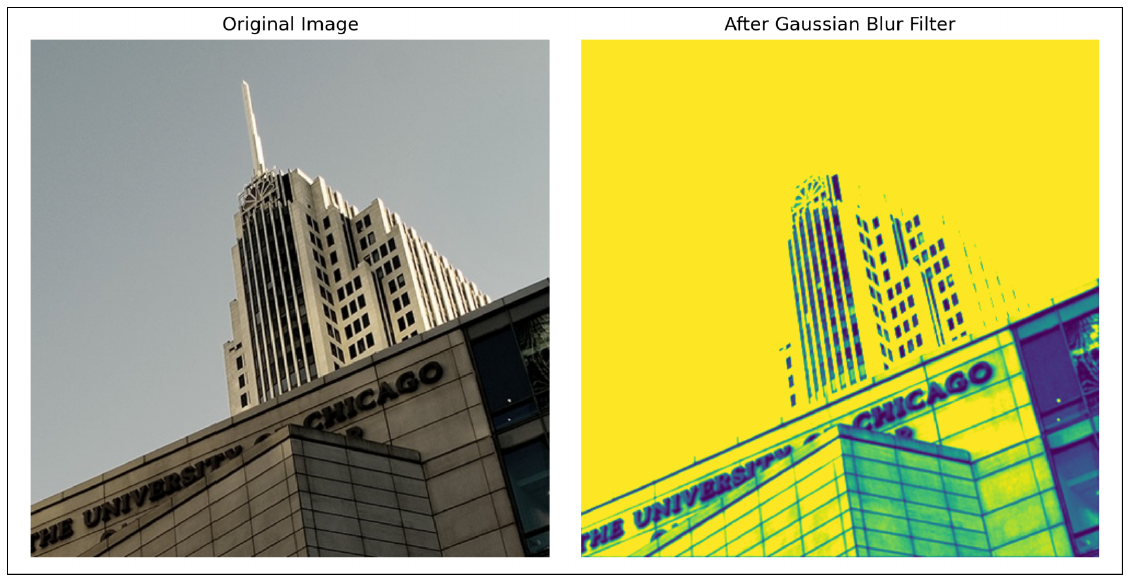
Running this code, we see that the input image isn’t really blurred but somehow a mix of all three input channels, as shown in this figure.
However, the more important task here is to understand the shapes of inputs and outputs. This listing shows what we get for the shapes of inputs, kernels, and output.
print(img_array.shape)
print(kernels['identity'].shape)
print(result.shape)
# Output
# (473, 473, 3)
# (3, 3)
# (473, 473)
You’ll notice that the resulting output is 473×473 because the input was 473×473×3, that is, with three channels. We also had a filter of size 3×3 with a stride of 1. With padding, our input became 474×475, and striding over it with a value of 1 would produce 473 steps in a row. If we were to go ahead and apply another filter here, the result would become 473×473×2. If we have a hundred filters, the output would be 473×473×100. Please stop here and make sure this calculation makes sense. It will be of paramount importance as we move to more complex models.
Filters vs Channels: A Crucial Distinction
This distinction between the number of channels in a filter and the number of filters is subtle but important. A single filter must match the input channel depth, but it always creates just one output channel. The number of filters determines how many channels your output will have.
In practice, CNNs typically use dozens or even hundreds of filters in each layer, creating rich, multi-channel representations that capture diverse aspects of the input. Each filter specializes in detecting different patterns, giving the network a comprehensive vocabulary for understanding images. Let’s explore this in further detail in the context of Keras next.
Practice: Calculating Output Shapes
It’s a really good idea to make sure you know exactly how these numbers work. These shapes are an essential part of any modern network, and you should internalize these calculations. As an example, try to calculate the output shape if we change the stride here to 2.
Conclusion
The Conv2D layer is the foundation that allows convolutional neural networks to understand images in a structured and efficient way. By applying small, learnable filters across local regions of an image, these layers extract meaningful patterns while keeping the number of parameters manageable. As we’ve seen, concepts like stride, channels, and filter depth directly determine how information flows through the network and how feature representations evolve from raw pixels into useful abstractions.
Understanding how shapes change—and why they change—is not just an academic exercise. It’s a practical skill that will save you hours of debugging and confusion as you build deeper and more complex models. With a solid grasp of Conv2D layers, channels, and filters, you’re now ready to move forward and see how modern deep learning frameworks like Keras put these ideas into practice at scale.
Editor’s note: This post has been adapted from a section of the book Keras 3: The Comprehensive Guide to Deep Learning with the Keras API and Python by Mohammad Nauman. Dr. Nauman is a seasoned machine learning expert with more than 20 years of teaching experience and a track record of educating 40,000+ students globally through his paid and free online courses on platforms like Udemy and YouTube.
This post was originally published 2/2026.



Comments