

In Swift, error handling is built around the idea of throwing errors when something goes wrong and letting calling code decide how to respond.
Before you can catch or handle errors, you need to understand how errors are created, thrown, and passed along through your code. In this blog post, you’ll learn how Swift’s throw and throws keywords work, how to throw both built-in and custom errors, and how errors propagate across functions, initializers, and closures. By the end, you’ll understand when and where Swift errors originate—and how they travel until they’re handled.
Throwing Errors in Swift Functions
The first hands-on example will be a function that throws an error in the Swift library. For this purpose, the listing below features the stringToUrl function, which attempts to convert the input string to an URL object. Note that the function signature contains the throws keyword, indicating that it may produce errors.
import Foundation
func stringToUrl(_ input: String) throws -> URL {
guard let url = URL(string: input) else {
throw URLError(.badURL)
}
guard url.host == "www.example.com" else {
throw URLError(.unsupportedURL)
}
return url
}
let url1 = try stringToUrl("http://www.example.com/api") // OK
let url2 = try stringToUrl("http://www.abc.com/api") // Error
In the first check, if the string isn’t a valid URL, an error of type URLError.badURL is thrown using the throw URLError(.badURL) expression. The syntax to throw an error is that simple!
In the second check, the function ensures that the host is www.example.com. If that’s not the case, then throw URLError(.unsupportedURL) is executed, throwing a different URLError case.
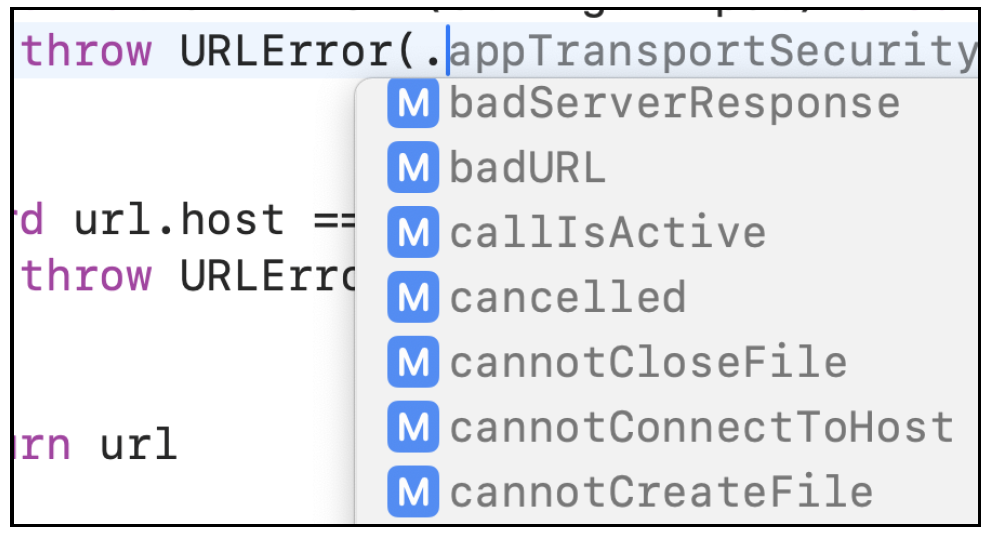
In this example, we’re reusing Swift’s built-in URLError type. To see all the usable cases under URLError, you can take advantage of the autocomplete feature of Xcode, as shown in this figure.
In the client code, url1 would be assigned successfully because the passed URL is valid and it is under the www.example.com domain, passing all checks of the stringToUrl function. The code will generate an error for url2 because the passed URL belongs to a different domain. The playground message about the uncaught error will appear as shown in this figure.
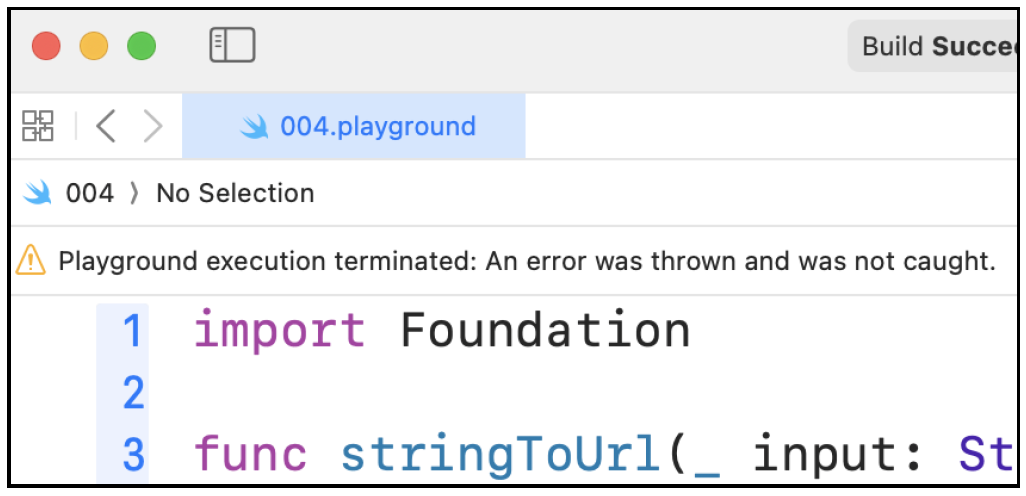
If the error was handled properly, the playground wouldn’t display such a message of course. This example doesn’t contain any error-handling mechanism; we’ll address that topic soon enough. For now, we’re focusing on throwing errors, not catching them.
Now, let’s continue by throwing a custom error.
Declaring and Throwing Custom Errors in Swift
In Swift, throwing a custom error is not too different from throwing a built-in error. The only extra work needed is to declare a custom enumeration implementing the Error protocol. For your convenience, the Error protocol doesn’t impose any complex logic or properties; it merely acts as a marker.
You can see such an example below. AgeValidationError is a custom Error enumeration that includes two cases: negative and tooYoung. Note that the tooYoung case accepts a parameter: tooYoung(minimum: Int) means that you can set a value for minimum to inform the client of the minimum age required.
enum AgeValidationError: Error {
case negative
case tooYoung(minimum: Int)
}
func validateAge(_ age: Int) throws {
if age < 0 {
throw AgeValidationError.negative
}
if age < 18 {
throw AgeValidationError.tooYoung(minimum: 18)
}
}
try validateAge(22) // OK
try validateAge(17) // tooYoung
In the flow of validateAge, there are two checks:
- If the age is negative, throw AgeValidationError.negative.
- If the age is less than 18, throw AgeValidationError.tooYoung.
In the client code, the second call will fail because the age is less than 18. That’s intuitive, right?
In our examples so far, we’ve worked with functions throwing errors. However, initializers can throw errors too! In the listing below, Member.init is marked with throws. This initializer contains an age-verification routine, and if the age is not OK, it throws an error—similar to the preceding former example.
enum AgeValidationError: Error {
case negative
case tooYoung(minimum: Int)
}
public class Member {
var name: String
var age: Int
init(name: String, age: Int) throws {
if age < 0 {
throw AgeValidationError.negative
}
if age < 18 {
throw AgeValidationError.tooYoung(minimum: 18)
}
self.name = name
self.age = age
}
}
let m1 = try Member(name: "Alice", age: 22) // OK
let m2 = try Member(name: "Bob", age: 17) // tooYoung
Naturally, struct or class functions may throw errors too. The listing below demonstrates an example in which Member.setAge throws an AgeValidationError if the passed age is not valid.
enum AgeValidationError: Error {
case negative
case tooYoung(minimum: Int)
}
struct Member {
var name: String
private var _age: Int = 0
init(name: String) { self.name = name }
func getAge() -> Int { return self._age }
mutating func setAge(_ age: Int) throws {
if age < 0 {
throw AgeValidationError.negative
}
if age < 18 {
throw AgeValidationError.tooYoung(minimum: 18)
}
self._age = age
}
}
var member = Member(name: "Joe")
try member.setAge(22) // OK
try member.setAge(17) // tooYoung
Note that throwing an error from a struct/class function has the same syntax as throwing an error from a standalone function; we simply emphasized the option to do so.
How Errors Propagate Through Swift Functions
Imagine that you have an outer function calling an inner function. If the inner function is marked as throws, then the outer function must either catch and handle the thrown error, or it must also be marked as throws and let the client handle the error.
Did that sound a bit complex? No worries: It will be made crystal clear via the listing below. In this example, the marryPeople outer function is internally calling validateAge.
enum AgeValidationError: Error {
case negative
case tooYoung(minimum: Int)
}
struct Person {
let name: String
let age: Int
var spouse: String? = nil
}
func validateAge(_ age: Int) throws {
if age < 0 {
throw AgeValidationError.negative
}
if age < 18 {
throw AgeValidationError.tooYoung(minimum: 18)
}
}
func marryPeople(bride: inout Person, groom: inout Person) throws {
try validateAge(bride.age)
try validateAge(groom.age)
bride.spouse = groom.name
groom.spouse = bride.name
}
Because the validateAge inner function may throw an error, the marryPeople outer function was also marked as throws. If validateAge throws an error, marryPeople will forward this error to the client, passing the thrown AgeValidationError.
This mechanism frees the programmer from the boilerplate code of catching and rethrowing errors in the outer function. You can simply mark the outer function as throws, making it forward any produced error from its inner mechanism.
Naturally, the outer function may catch and handle the error if necessary; there is no limitation in that regard.
Another mechanism for error propagation works via the rethrows keyword. If you have function accepting a closure, and the closure may throw an error, then your function ought to be marked as rethrows. Check the corresponding example.
func backupFileToCloud() throws { }
func saveFileToDisk() throws { }
func backupAndSave(backupTask: () throws -> Void,
saveTask: () throws -> Void) rethrows {
print("Creating backup...")
try backupTask()
print("Backup done. Now saving file...")
try saveTask()
print("Operation completed.")
}
try backupAndSave(backupTask: backupFileToCloud,
saveTask: saveFileToDisk)
In this example, the backupAndSave function accepts two closures able to throw errors. Therefore, backupAndSave was marked as rethrows, indicating that it would forward any closure error it encounters.
Using rethrows is a good practice because it clarifies that the function itself doesn't introduce new error conditions; rather, it relies on the errors from its closure parameters. But if the function throws nonclosure errors too, then it must be marked as throws. Don’t worry, the compiler will ensure that anyway.
Conclusion
Throwing errors in Swift is a deliberate and structured process that makes failure explicit and predictable. Whether you’re using built-in error types like URLError, defining your own Error enumerations, or propagating failures through functions and closures with throws and rethrows, Swift gives you fine-grained control over how errors move through your code. Understanding how and where errors are thrown lays the foundation for effective error handling.
Editor’s note: This post has been adapted from a section of the book Swift: The Practical Guide by Kerem Koseoglu. Dr. Koseoglu is a seasoned software engineer, author, and educator with extensive experience in global software development projects. In addition to his expertise in ABAP, he is also proficient in database-driven development using Python and Swift. He is the author of Design Patterns in ABAP Objects (SAP PRESS), as well as several best-selling technical books in Turkey. He has a Ph.D. in organizational behavior.
This post was originally published 1/2026.




Comments